Key Takeaways
- Amazon's Alexa for Shopping now offers a new feature to verify the authenticity of suspicious communications claiming to be from Amazon.
- Customers can ask Alexa about emails, texts, or phone calls, providing details for verification against Amazon's records.
- Alexa provides responses indicating if a message is legitimate, does not correspond with Amazon's records, or cannot be verified with certainty.
- Beyond Alexa, Amazon also offers `verify@amazon.com` and a dedicated web form for global communication verification.
- Every verification query submitted through Alexa automatically helps Amazon's customer protection team identify and track emerging scam campaigns.
- Users are still advised to exercise caution, avoid clicking suspicious links, and always verify account issues directly through official Amazon channels.
In an era where digital deception is increasingly sophisticated, Amazon is rolling out a powerful new tool to help customers distinguish genuine communications from elaborate scams. With countless individuals relying on Amazon for their shopping needs, the company has become a prime target for fraudsters, leading to a deluge of convincing phishing attempts that can trick even the most vigilant users. From fake delivery warnings to urgent account alerts, these scams often leverage Amazon's trusted brand to pressure recipients into divulging sensitive information or clicking malicious links.
Recognizing the growing challenge, Amazon has integrated a critical verification feature into its existing Alexa for Shopping service. This innovation directly addresses a common customer dilemma: 'Did Amazon actually send this?' The company reports that approximately 360,000 customers annually contact support with this very question, underscoring the urgent need for a more accessible and immediate solution.
Amazon's New Weapon Against Scams: Alexa for Shopping
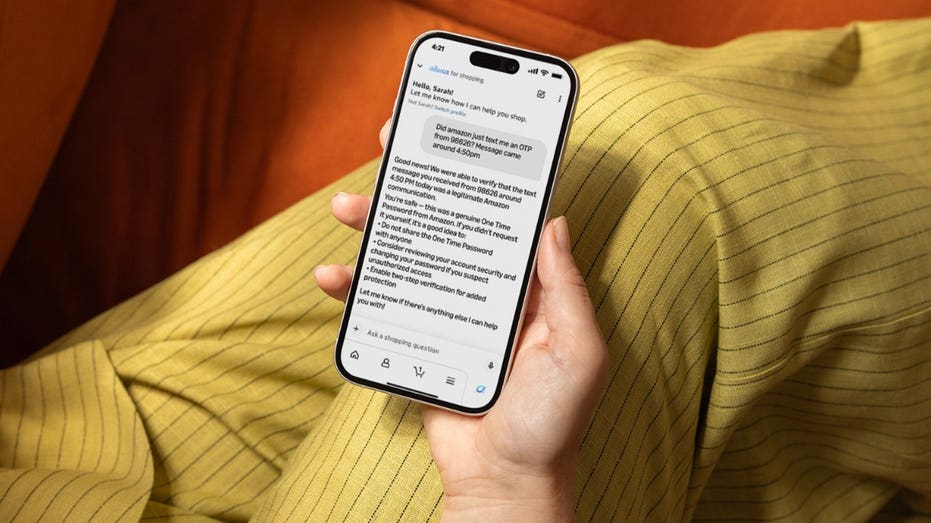
The new verification tool allows U.S. customers to leverage Alexa for Shopping to inquire about the legitimacy of any message purporting to be from Amazon. Whether it's an email, a text message, or even a phone call, users can now describe the communication to Alexa for an instant check. For instance, you might ask, 'Did Amazon send me a text about a delivery problem yesterday?' or 'Was that Prime membership email from Amazon?' You can even provide details about a phone call from someone claiming to offer an exclusive deal.
When a query is made, Alexa for Shopping cross-references the provided information—such as sender details, message content, timing, and formatting—against Amazon's extensive communication records. This sophisticated approach gives Amazon a significant advantage over generic scam detection tools, as it can compare the suspicious message directly with communications generated through its own secure systems. Amazon emphasizes that it will only confirm a message as legitimate if its technology has 'complete confidence' in the match.
How Alexa Responds to Your Queries
Alexa's response will depend on the outcome of its verification process. If the communication precisely matches Amazon's records, Alexa for Shopping will confirm its authenticity and may even provide additional details about the message. Conversely, if the message does not align with Amazon's official communications, the tool will inform you that the information provided 'does not appear to correspond with an official Amazon communication.'
In cases where a message is deemed suspicious, Amazon may advise you to check your orders directly within the official Amazon app or website, or to contact Amazon through its verified support channels. Crucially, users are always warned against clicking any links embedded within unverified messages. There's also a possibility that Alexa may state it 'cannot verify the communication with certainty.' In such instances, Amazon will guide you through additional steps, such as submitting more detailed information or utilizing other available verification options.
Beyond Alexa: Other Verification Avenues
The Alexa integration is part of Amazon's broader strategy to combat impersonation scams. Earlier this year, the company launched `verify@amazon.com`, a dedicated email address where anyone worldwide can forward suspicious messages for verification, regardless of whether they have an Amazon account or app. Additionally, Amazon provides a communication verification form accessible through its customer service pages, offering another reliable method to confirm message authenticity.
An interesting and impactful aspect of the new Alexa feature is that every verification submission is automatically reported to Amazon's customer protection and enforcement team. This invaluable data helps Amazon proactively identify emerging scam campaigns and track the tactics of malicious actors impersonating the company, turning individual queries into collective protection.
Staying Vigilant: Essential Scam Prevention Tips
Amazon scams thrive on urgency and familiarity. A message about a 'locked account' or an 'unusual order' can trigger a quick, unthinking response. Therefore, even with these new tools, continued vigilance is paramount. Always be cautious of messages that pressure you to act immediately or threaten consequences if you don't respond. Scammers aim to bypass your critical thinking by creating a sense of panic.
If a message claims your account will close or a package requires immediate action, resist the urge to click any links. Instead, open the official Amazon app or visit the Amazon website directly to check your account status. Amazon will never ask you to purchase gift cards as payment to resolve an account problem or make a payment. Any such request is a definitive red flag, and communication should cease immediately.
Exercise extreme caution if a caller claiming to represent Amazon asks for sensitive account information like your password or a one-time passcode. Amazon explicitly states it will never request these details over the phone. If this occurs, end the call and contact Amazon through an official channel. Be aware that scammers can spoof caller ID, making calls appear to originate from Amazon. If an unexpected call discusses refunds or account issues, hang up and verify independently.
To further protect yourself from phishing and malware, consider using robust antivirus software on all your devices. While no software can replace good judgment, it can help detect malicious links and downloads. Ultimately, the safest practice remains: if an Amazon message feels suspicious, go around it. Open Amazon yourself, check your account, and use Amazon's official verification tools before taking any action.
Why This Matters
The integration of scam verification into Alexa for Shopping represents a significant step forward in Amazon's commitment to customer security. By providing accessible, real-time tools for authentication, Amazon empowers users to defend themselves against increasingly sophisticated cyber threats, fostering a safer online shopping environment for everyone.